
Picture a team building a peg-in-hole assembly policy. They mount a wrist camera, record a few hundred clean demonstrations in 4K, retrain twice, and still cannot explain why the policy keeps jamming the peg against the hole wall a few millimeters short. The video looks complete. It shows the peg, the hole, the approach, the contact. What it does not show is how hard the peg was pressing against the wall right before it slipped in, because nobody put a force sensor on the wrist. The camera recorded everything except the one signal the task actually depended on.
This is the quiet failure mode behind a lot of robotics data programs: treating "we have a camera recording" as equivalent to "we are capturing the data this task needs." They are not the same claim, and the gap between them is what this article is about.
The short version
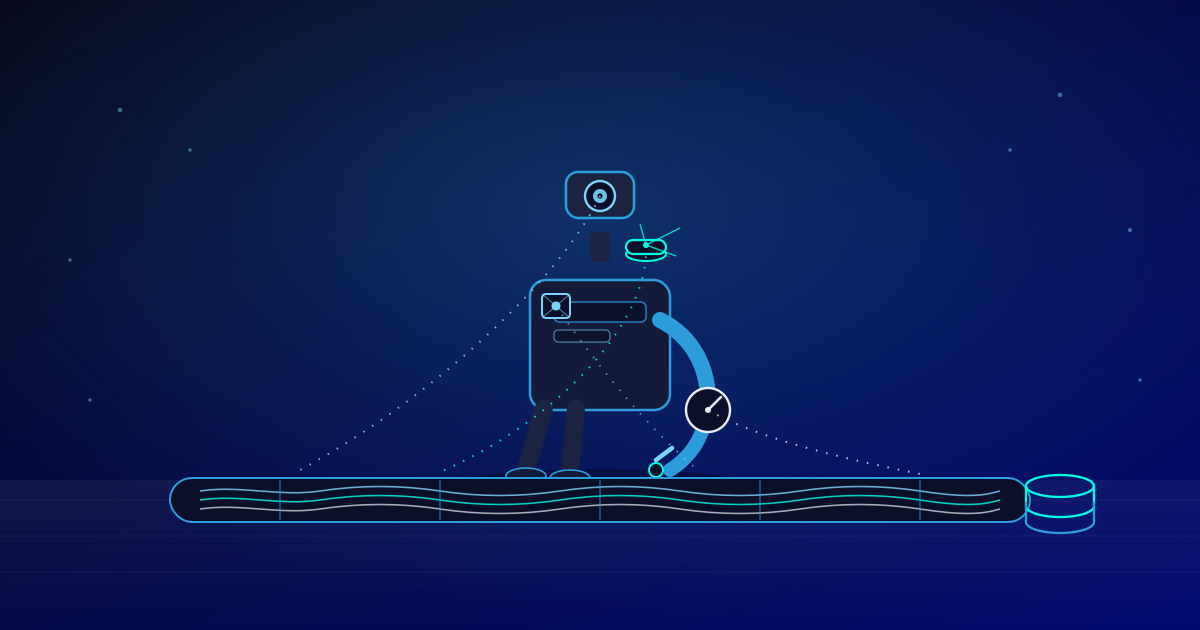
Sensor data collection for robotics is choosing which sensors to mount, cameras, depth, LiDAR, IMUs, force-torque, tactile, and running them so every stream lands on one shared clock with a known calibration baseline. No single sensor covers every failure mode a task can produce. The work is matching sensors to the questions a task actually asks, then proving, at capture time, that the streams agree with each other closely enough to train on.
Why "we recorded video" is not the same as "we collected the data"
Most guides to sensor data collection are written for industrial IoT: temperature probes, vibration monitors, pressure gauges on a factory line, feeding a dashboard. That content answers a different question than the one a robotics team is actually asking. A standardbots breakdown of robot sensor types is closer to the real territory: RGB cameras for semantic texture, RGB-D cameras that add per-pixel depth, and event-based cameras that react to brightness changes on microsecond timescales, each suited to a different part of what a robot needs to perceive.
The humanoid and mobile-robot sensor market is growing fast enough that getting this right has real commercial stakes. IDTechEx forecasts the humanoid robot sensor market could exceed $6.59 billion by 2037, growing at a 21.4% CAGR, and groups commercial humanoid sensing into five typical categories: perception, force-torque, encoders, IMUs, and, increasingly, tactile. That is a useful signal that the sensor stack for robots is still expanding, not settling, which is exactly why the capture side deserves its own treatment separate from what happens to the data afterward.
This article stays on the capture side on purpose. What happens once these streams exist, combining them into one model of the world, is covered in our companion piece on sensor fusion in physical AI. Here, the question is narrower and, we'd argue, more foundational: what does each sensor actually record, when do you need it, what does it cost you, and how do you keep it from drifting apart from every other sensor on the rig.
The sensor selection ladder: six questions a capture rig has to answer
Every sensor on a robot exists to answer one specific question a task is asking. Ordering them by the question they answer, from the cheapest and most universal to the most precise and contact-specific, makes it obvious why real rigs stack several sensors rather than picking a favorite.
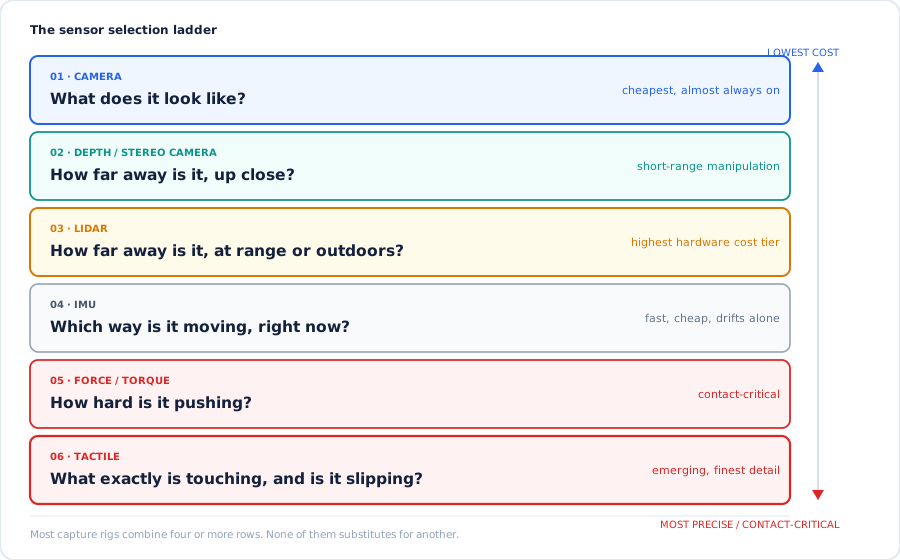
Six questions, six sensor types. Most working rigs answer at least four of these questions at once, not just one.
Camera: what does it look like?
An RGB camera is the cheapest, most universal sensor on almost any robot, and it is the only one that reads color, texture, and labels the way a person does. It cannot measure true depth on its own, and it struggles with glare, darkness, and reflective or clear surfaces, which is why it is almost never the only sensor on a serious capture rig.
Depth or stereo camera: how far away is it, up close?
Depth and stereo cameras add per-pixel distance within a short range, which is exactly what manipulation arms need to know where an object's surface actually is. They still struggle with shiny, clear, or very dark materials, the same surfaces that confuse plain RGB, because both rely on light reflecting predictably.
LiDAR: how far away is it, at range or outdoors?
LiDAR times laser returns to build a dense 3D point cloud and keeps working in low light or texture-sparse scenes where cameras lose their footing, which is why mobile robots and vehicles lean on it for outdoor and long-range work. It is also typically the most expensive sensor on the ladder. Automotive-grade solid-state units are pushing that down. One supplier covered by IEEE Spectrum is reportedly targeting production pricing under $200 per unit, with a longer-term goal nearer $100, though those are stated targets rather than confirmed shipping prices, and robotics-grade LiDAR pricing isn't published as consistently as the automotive figures.
IMU: which way is it moving, right now?
An inertial measurement unit tracks acceleration and rotation fast enough to catch motion a camera's frame rate would blur past. A common 9-axis IMU built on the BNO085 chip ships at a default of 100 Hz, configurable up to 200 Hz, which is fast and cheap, but IMUs drift when used alone over time, so they are almost always paired with vision or encoders rather than trusted on their own.
Force-torque: how hard is it pushing?
A force-torque sensor, usually mounted at the wrist, measures the push and twist a robot is applying, which no camera can see. ATI/Novanta's Mini40, a commonly used wrist sensor, lists a 40 kHz sample rate with under 1 millisecond of latency, though the vendor notes the effective rate your rig actually gets depends on your data acquisition hardware, not just the sensor's rated spec. This is the sensor the peg-in-hole team in our opening story was missing.
Tactile: what exactly is touching, and is it slipping?
Tactile sensors go a step past force-torque by resolving contact location, pressure pattern, and slip across a surface, not just the net force at a joint. Vision-based tactile sensors such as DIGIT put a tiny camera behind a soft gel pad to capture this at high resolution. The RCT dataset recorded 29,279 tactile frames from robot presses on 122 industrial materials using three DIGIT sensors, and the TaF-Dataset pairs a vision-based tactile sensor with an ATI six-axis force-torque sensor across more than 10 million synchronized frames, which is itself a sign of how tightly these two sensor types are expected to work together rather than substitute for each other.
Why the clock matters more than the sensor spec sheet
A sensor's rated accuracy means nothing if its timestamp is wrong relative to the other sensors on the rig. This is the part of sensor data collection that gets the least attention and causes the most expensive failures.
Research on robotic sensor synchronization backs this up directly. One paper on precise sensor synchronization found that triggering cameras and IMUs from host software introduces different delays per device, because each sensor's driver stack behaves differently, and built a custom board that sends trigger pulses to every sensor with minimal variation instead. A separate mapping-robot dataset paper describes a simpler but effective version of the same idea: a microcontroller generates trigger pulses and timestamps them, those timestamps are logged on the host, and frames triggered together are matched to those timestamps in post-processing, because USB and CPU scheduling otherwise make camera frames arrive at inconsistent times even when they were captured together.
A practitioner write-up on egocentric robotics capture lays out a useful hierarchy, from strongest to weakest: sensors sharing one physical clock, then hardware trigger lines or a common timestamping unit, then network time protocols like NTP or PTP as a fallback. It also makes a distinction worth repeating: accuracy is the average offset from a reference clock, while jitter is how much that offset varies between samples, and jitter is usually the harder problem to fix after the fact, because a steady bias can be corrected in post-processing but scattered, inconsistent timestamps generally cannot.
Where this connects to fusion
Everything in this section is a capture-time problem, not an algorithm problem. Fusion models can be tolerant of noisy individual readings, but they cannot invent correct timing from streams that were never aligned when recorded. If you want the next layer, how teams actually combine already-synchronized camera, motion, and touch data into one model, that is the subject of our sensor fusion in physical AI guide. This article stops at getting the streams onto one clock in the first place.
What a real capture program actually tracks
A case study from Defined.ai on sensor data collection for robotics gives a concrete sense of what "clean" means in practice, rather than in the abstract. The client needed synchronized recordings of natural human behavior including hand and body motion, gaze, depth, and grip force. Defined.ai delivered 225 hours of finished, synchronized recordings across multiple kits, held the dropped-frame rate to 1 to 2% against a 10% ceiling, and supported a minimum of 30 frames per second throughout. They also capped recording at 5 hours per kit, per environment, per task, specifically to limit duplication and force variety into the dataset rather than letting volume substitute for coverage.
None of those numbers are universal targets. They are what one team decided to measure and hold itself to. The pattern worth copying is that there were numbers at all: a frame-drop ceiling, a minimum frame rate, and a duplication cap, checked during collection rather than discovered during training.
Buying LiDAR because it sounds more serious
LiDAR is the right tool for long-range or outdoor structure, not a default upgrade for every robot. A tabletop manipulation rig gets more out of a good depth camera and tighter calibration than it does from a sensor built to resolve objects fifty meters away.
Skipping force-torque because the video looks fine
Video can look complete and still be missing the one signal a contact-heavy task depends on. If a task involves pushing, inserting, or handling something that can deform, plan for a force or tactile sensor before you start recording, not after the policy fails in the same spot every time.
Treating the rated sample rate as the delivered one
A force-torque sensor rated at 40 kHz is only as fast as the data acquisition hardware reading it, and an IMU rated at 200 Hz can arrive at 40 Hz if the host loop is too slow. Measure the rate you actually get on your own rig before trusting the spec sheet.
Calibrating once at setup and never again
Brackets flex, lenses shift, and sensors drift over weeks of normal use. Log a calibration baseline at the start of every session, not just once when the rig is built, so drift shows up as a flagged anomaly instead of a silent, untraceable quality problem.
Matching the sensor to what the task is actually asking
| Sensor | What it actually measures | Typical cost tier | When you need it |
|---|---|---|---|
| RGB camera | Color, texture, semantics, labels | Lowest | Nearly every task; rarely sufficient alone |
| Depth / stereo camera | Short-range 3D shape | Low to mid | Manipulation, grasping, close-range navigation |
| LiDAR | Precise distance and structure at range | Highest | Outdoor or long-range mobile robots, vehicles |
| IMU | Acceleration and rotation, fast | Low | Legged robots, drones, any fast-moving platform |
| Force-torque | Contact force and torque at a joint | Mid to high | Assembly, insertion, anything that pushes or pulls |
| Tactile | Contact location, pressure pattern, slip | Mid to high, emerging | Dexterous manipulation, deformable or fragile objects |
If a task sits mostly in free space, cameras, depth, and an IMU usually cover it. The moment a task involves sustained contact, the table's bottom two rows stop being optional. Our 3D point cloud data collection and LiDAR data collection services cover the range end of this table; most of what we see teams get wrong is under-investing in the contact end instead.
What this means for a team starting today
Start from the task, not the catalog. Write down the specific questions your task needs answered, not "what sensors do good robots have," and let the sensor selection ladder above tell you which rungs you actually need. A pick-and-place task in a stable, well-lit cell probably needs rungs one, two, and four. A peg-in-hole or deformable-object task needs rungs five and six as well, and skipping them is the single most common reason a policy looks fine in review and fails in deployment.
Decide your synchronization method before you buy a single sensor, not after the first recording session. Hardware triggers and a shared clock cost very little compared to a data collection campaign, and retrofitting synchronization onto months of already-recorded, already-drifted footage is far more expensive than building it in from the first session.
Measure what you deliver, not just what you intend. A frame-drop ceiling, a minimum sample rate, and a documented calibration baseline, checked every session rather than assumed, turn "we recorded it" into "we can train on it." For the next step once your streams are captured and synchronized, our guide to sensor fusion in physical AI covers how those streams get combined into a single model. And if you are scoping a collection program and still deciding build versus buy, our guides to data collection for robotics and human demonstrations for robot training cover the collection methods this article's sensors feed into, while physical AI data quality covers what happens after capture to keep that data trainable. For hands-on capture work, our physical AI data collection team builds these rigs, synchronization included, rather than treating it as an afterthought.