
Every computer vision model is only as good as the labels it learns from. A model that detects pedestrians, picks parcels off a conveyor, or flags a tumour in a CT scan has seen thousands of examples where a human (or a human-checked tool) marked exactly what was where. That labelling work is called data annotation, and it comes in two broad flavours: 2D and 3D.
2D annotation labels flat images and video frames. 3D annotation labels data that carries depth: LiDAR point clouds, depth-camera scans, stereo reconstructions, and volumetric medical images. The choice between them changes almost everything about an AI project: which sensors you buy, which tools your annotators use, how long each frame takes, what it costs, and what your model can eventually do in the real world.
This guide breaks down how 2D and 3D data annotation differ, the main techniques in each, where each one is used, and how to decide which your project needs, or whether you need both.
What Is 2D Data Annotation?
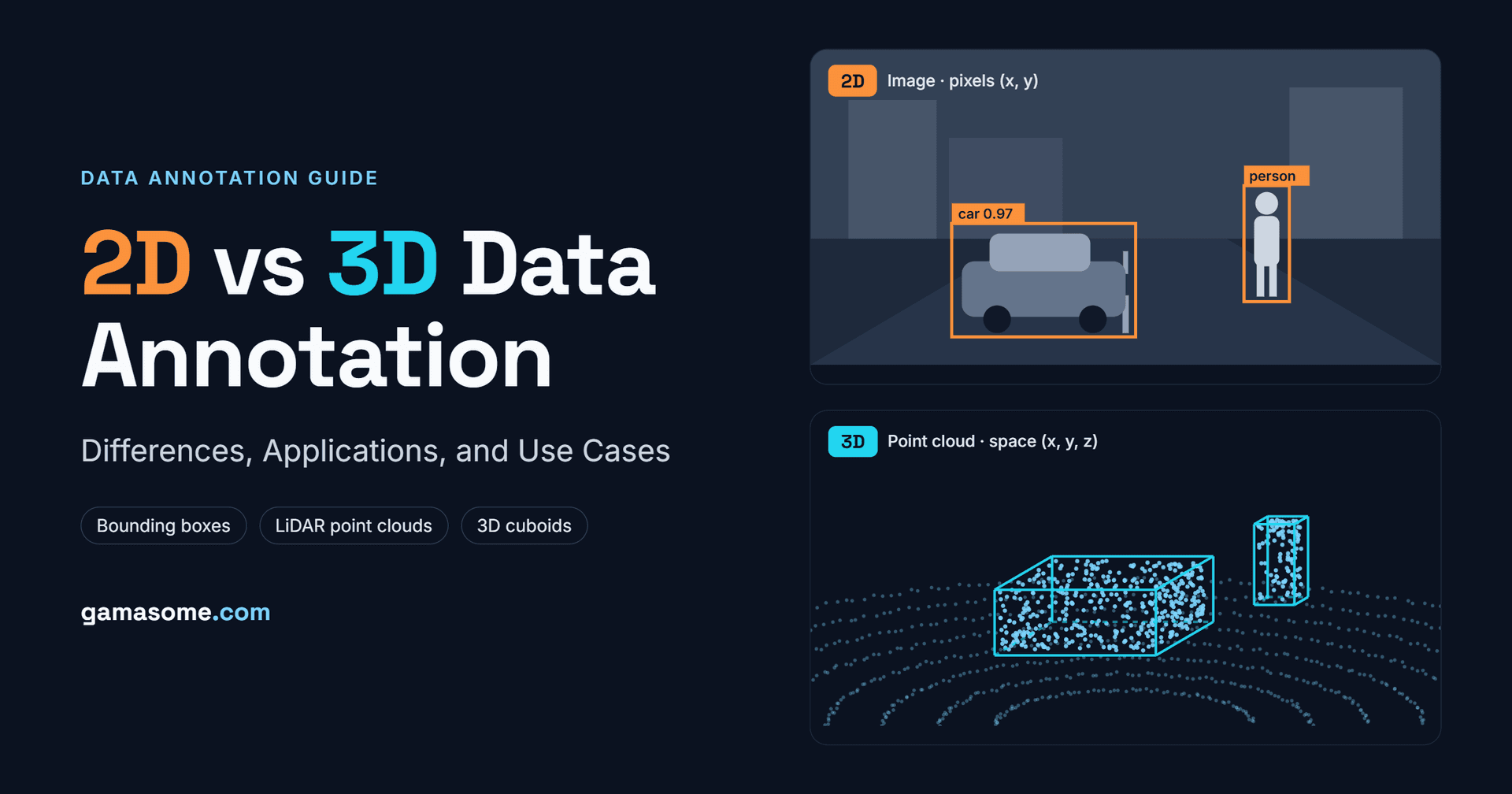
2D data annotation is the process of labelling objects or regions in two-dimensional visual data, mainly photographs and video frames. Each label is defined by pixel coordinates on the X and Y axes. The model learns what an object looks like and where it sits in the image, but not how far away it is or how big it is in the physical world.
2D annotation has been the backbone of computer vision for more than a decade. Public datasets such as COCO and ImageNet, and most commercial vision products, are built on it. It is relatively fast, the tools are mature, and a large pool of trained annotators can do it.
Common 2D Annotation Techniques
• Image classification: A single label for the whole image ("defective" / "not defective").
• Bounding boxes: Rectangles drawn tightly around each object. The fastest and most common technique, used for object detection.
• Polygons: A closed outline that follows an object's real edges, used when a rectangle would include too much background (irregular products, buildings in aerial imagery).
• Semantic segmentation: Every pixel in the image gets a class, such as road, sidewalk, car or sky.
• Instance and panoptic segmentation: Like semantic segmentation, but each individual object (car #1, car #2) gets its own mask. Panoptic combines both.
• Keypoints and skeletons: Named points such as joints, facial landmarks or a product's corners, used for pose estimation and gesture recognition.
• Polylines: Open lines for lane markings, cables, roads or crop rows.
If you want a refresher on how labelling and annotation relate, see our guide on data annotation vs data labeling.
What Is 3D Data Annotation?
3D data annotation labels objects and regions in three-dimensional space. Instead of pixels, the annotator works with points, voxels or meshes that have X, Y and Z coordinates. Each label captures not just what an object is, but its real-world position, its size in metres, and its orientation (which way it is facing).
The data usually comes from:
• LiDAR sensors, which fire laser pulses and record each return as a point. A single frame from a high-resolution LiDAR can contain over 100,000 points (Encord).
• Depth and RGB-D cameras (structured light or time-of-flight), common in indoor robotics.
• Stereo cameras, which reconstruct depth from two viewpoints.
• 3D scanners and photogrammetry, which produce meshes for digital twins and AR.
• Volumetric medical imaging such as CT and MRI, where a scan is a stack of slices made of voxels.
Common 3D Annotation Techniques
• 3D bounding boxes (cuboids): An oriented box around each object, defined by its centre (x, y, z), dimensions (length, width, height) and heading angle. This is the most common starting point for point cloud work (CVAT).
• Point cloud semantic segmentation: Every point gets a class. Dense and powerful, but slow without AI-assisted pre-labelling.
• Instance and panoptic segmentation in 3D: Separates individual objects (each car, each person) while also labelling background classes.
• 3D object tracking: The same object keeps a consistent ID across consecutive frames, so models can learn motion and predict trajectories. This is often called 4D annotation.
• 3D polylines and keypoints: Lane boundaries, curbs and poles in space, or joints for 3D human pose.
• Voxel and mesh annotation: Labelling volumes in CT/MRI scans or regions on 3D models.
• Sensor fusion annotation: Labels drawn in the point cloud and projected consistently into synchronised camera images (and sometimes radar).
2D vs 3D Data Annotation: Key Differences
| Factor | 2D Data Annotation | 3D Data Annotation |
|---|---|---|
| Input data | Images, video frames | LiDAR point clouds, depth scans, stereo, CT/MRI volumes, meshes |
| Coordinates | X, Y (pixels) | X, Y, Z (metres or voxels) + orientation |
| What the model learns | Appearance, class, position in the frame | Real size, distance, position and heading in space |
| Typical label types | Boxes, polygons, masks, keypoints, polylines | Cuboids, point/voxel segmentation, 3D tracking, 3D polylines |
| Data density | Dense: every pixel has a value | Sparse: points thin out with distance |
| Visual context | Rich colour, text, signs, texture | Geometry first; colour only via fusion with cameras |
| Tooling | Mature, browser-based, many options | Specialised 3D viewers, calibration, multi-sensor sync |
| Annotator skill | Can be trained quickly | Needs spatial reasoning and sensor knowledge |
| Time and cost per frame | Lower | Several times higher |
| QA complexity | Visual check per image | Checks across views, frames and sensors |
1. Depth and Spatial Understanding
This is the core difference. A 2D box tells a model that a pedestrian occupies a certain region of the image. It cannot tell the model whether that pedestrian is 4 metres or 40 metres away. A 3D cuboid encodes exactly that, plus the person's height and the direction they are facing. For any system that has to move, brake, grasp or navigate, that spatial ground truth is what turns perception into safe action. We cover this perception-to-action loop in How Physical AI Works.
2. Data Density and Sparsity
Images are dense: every pixel has a value. Point clouds are sparse and uneven. Label Your Data notes that a LiDAR might return around 1,000 points per square metre at 2 metres but only about 10 at 20 metres (Label Your Data). A distant cyclist might be just a dozen points, which makes it hard to decide where the object ends and requires clear guidelines on minimum point counts and occlusion.
3. Effort, Time and Cost
Because annotators must rotate the scene, check multiple views and fit boxes in three axes, 3D work takes far longer. Industry estimates put point cloud annotation at roughly 6–10× the time of comparable 2D work (Label Your Data). Camera annotation is significantly cheaper per frame, which is why many teams use camera-first pipelines when budget is tight (Kognic). In medical imaging, fully labelling a 3D scan by hand can take over an hour per volume.
4. Tools and Infrastructure
2D annotation runs comfortably in a browser. 3D annotation needs viewers that render millions of points smoothly, sensor calibration files, time synchronisation across sensors, and support for formats like .pcd, .las, .bin, DICOM and NIfTI. Interpolation across keyframes and AI pre-labelling are close to essential at scale.
5. Skills and Quality Assurance
A new 2D annotator can be productive within days. 3D annotators need spatial reasoning, an understanding of how LiDAR behaves (reflections, rain noise, ego-vehicle points), and familiarity with the domain. QA also gets harder: reviewers must confirm that a cuboid is tight in every axis, that its heading is right, that the track ID never swaps, and that the 3D label lines up with the camera image. Our article on data quality in AI training goes deeper into building QA loops that catch these errors.
How 2D and 3D Annotation Differ in a Real Scene
Take a single pedestrian crossing in front of a delivery robot.
With 2D annotation, the robot's camera image has a box around the person labelled "pedestrian", maybe with keypoints on the joints. The model learns to recognise people in images and roughly where they are in the frame.
With 3D annotation, the LiDAR scan has a cuboid that says the person is 3.2 metres ahead, 0.4 metres to the left, 1.7 metres tall, and walking to the right. Tracked over 20 frames, it also shows they are moving at about 1.3 m/s.
The first tells the robot what is there. The second tells it where, how big and where it is going, which is what it needs to decide whether to stop. Combine them and you get both identity and geometry, which is the idea behind sensor fusion in physical AI.
Applications and Use Cases of 2D Data Annotation
• Retail and e-commerce: Product recognition, shelf monitoring, visual search and checkout-free stores.
• Security and surveillance: Person and vehicle detection, crowd counting and licence plate recognition.
• Agriculture: Crop and weed detection, fruit counting and disease spotting from drone or field images.
• Manufacturing quality control: Finding scratches, dents and misalignments on production lines with segmentation and bounding boxes. See Physical AI in Manufacturing.
• **Medical imaging (2D): **X-rays, dermatology photos, pathology slides and retinal scans.
•** Document AI**: Bounding boxes on fields in invoices, IDs and forms for OCR and extraction.
• Sports and fitness: Keypoint-based pose estimation for coaching, form correction and broadcast analytics.
• ADAS camera perception: Lane markings, traffic signs and traffic lights, which rely on colour and text.
Applications and Use Cases of 3D Data Annotation
Autonomous Vehicles and ADAS
This is the biggest driver of 3D annotation demand. Self-driving stacks need exact distances, sizes and headings for every car, cyclist and cone around them. The public nuScenes dataset shows the scale involved: 1,000 twenty-second driving scenes from Boston and Singapore, captured with 6 cameras, 5 radars and 1 LiDAR, and around 1.4 million 3D bounding boxes across 23 object classes (nuScenes, CVPR 2020). Its Panoptic nuScenes extension goes further, labelling about 1.4 billion individual LiDAR points (Segments.ai). For more on why this data is the real bottleneck for automakers, read Data Collection in the Automotive Industry.
Humanoid and Embodied AI
Humanoids learn manipulation from demonstrations that combine video, depth and motion. Annotating 3D hand poses, object positions and contact points is central to that training.
Medical Imaging (3D)
CT and MRI scans are volumes, so segmenting an organ or tumour means labelling voxels across hundreds of slices. Datasets are growing fast: the MedSAM2 project curated more than 455,000 3D image–mask pairs across CT, PET and MRI (MedSAM2, arXiv). Accurate 3D segmentation supports surgery planning, radiotherapy targeting and organ-volume measurement.
Drones, Mapping and Smart Cities
Aerial LiDAR and photogrammetry are annotated to classify terrain, buildings, power lines and vegetation for HD maps, utilities inspection, construction progress tracking and urban planning.
AR/VR, Digital Twins and Gaming
AR apps need to understand rooms in 3D to place virtual objects on real surfaces. Digital twins of factories and buildings rely on labelled scans and meshes. Game and simulation studios also use annotated 3D data to build realistic training environments, which ties into the synthetic vs real-world data debate.
When to Choose 2D, 3D, or Both
Choose 2D Annotation When:
• Your model only needs to recognise or classify objects, not measure distance.
• Your hardware is camera-only (phones, CCTV, drones without LiDAR).
• You need large labelled volumes on a limited budget.
• Colour, text or texture carries the key signal.
Choose 3D Annotation When:
• The system acts physically: drives, flies, grasps or navigates.
• You need real-world measurements such as size, distance, volume or heading.
• Your sensors include LiDAR, depth cameras, radar or volumetric scanners.
• Safety depends on precise localisation, as in AVs, surgical robots and industrial cobots.
Choose both (sensor fusion) When:
• You need identity and geometry, such as a traffic light's colour plus its exact position.
• You want redundancy so the system still works when one sensor struggles (camera at night, LiDAR in heavy rain).
• You are building production-grade autonomy, where fused, consistent 2D-3D labels are now the norm. Our multimodal data collection guide explains how to capture this data correctly from the start.
Best Practices for 2D and 3D Annotation Projects
1. Start with the model's needs, not the tool: Define the outputs your model must predict, then choose the simplest label type that supports them. Cuboids are often enough; full point segmentation is only worth it if the model truly needs dense scene understanding.
2. Write detailed guidelines with visual examples: Cover occlusion, truncation, minimum point counts, class hierarchies and ambiguous cases like whether a curb counts as road or sidewalk.
3. Curate before you label: Labelling every 3D frame is one of the fastest ways to burn budget. Pick diverse, informative frames and deliberately include rare scenarios; see edge case data collection.
4. Use AI-assisted pre-labelling with human review: Models generate first-pass boxes or masks; humans correct them. In medical imaging, active-learning approaches that ask annotators to label only the most uncertain slices have cut the slices needing manual work to around 15–35% while keeping accuracy.
5. Run pilots on representative data: Validate tools, guidelines and annotator skill on a small batch before scaling.
6. Build multi-layer QA: Combine peer review, expert review, automated checks (box size limits, track ID consistency, 2D-3D projection alignment) and measurable acceptance metrics.
7. Decide in-house vs outsourced early: 3D work needs specialised people and tools. Read In-House vs Outsourced Data Annotation and our list of the best data annotation companies to compare options.
The Future: From 2D to 3D to 4D
The industry is steadily moving from flat images toward richer spatial and temporal labels. Three trends stand out:
• 4D annotation (3D plus time) is becoming standard for autonomy, because prediction and planning models need to know how objects move, not just where they are.
• Foundation models for labelling, such as SAM-style segmenters adapted for 3D and video, are cutting manual effort and shifting human work toward review and edge cases.
• Physical AI is expanding 3D annotation beyond cars into humanoids, warehouse robots, drones and home assistants. We explore this shift in The Future of Physical AI.
2D annotation isn't going away. It remains the fastest and cheapest way to teach a model what things look like. But as AI moves off screens and into the physical world, 3D annotation is what teaches it where things are.
Conclusion
2D and 3D data annotation solve different problems. 2D annotation teaches models to recognise objects in images quickly and affordably, and it powers most of today's retail, security, agriculture and document AI. 3D annotation teaches models to understand space, which makes it essential for autonomous vehicles, robotics, medical volumes and AR. It costs more, needs specialised tools and skilled annotators, and pays off wherever a model has to act safely in the real world.For most advanced projects, the real answer is both: tightly synchronised 2D and 3D labels that give a model identity and geometry at the same time. Need high-quality 2D, 3D or sensor-fusion annotation for your AI or robotics project? Talk to the Gamasome team or explore our data annotation services.