
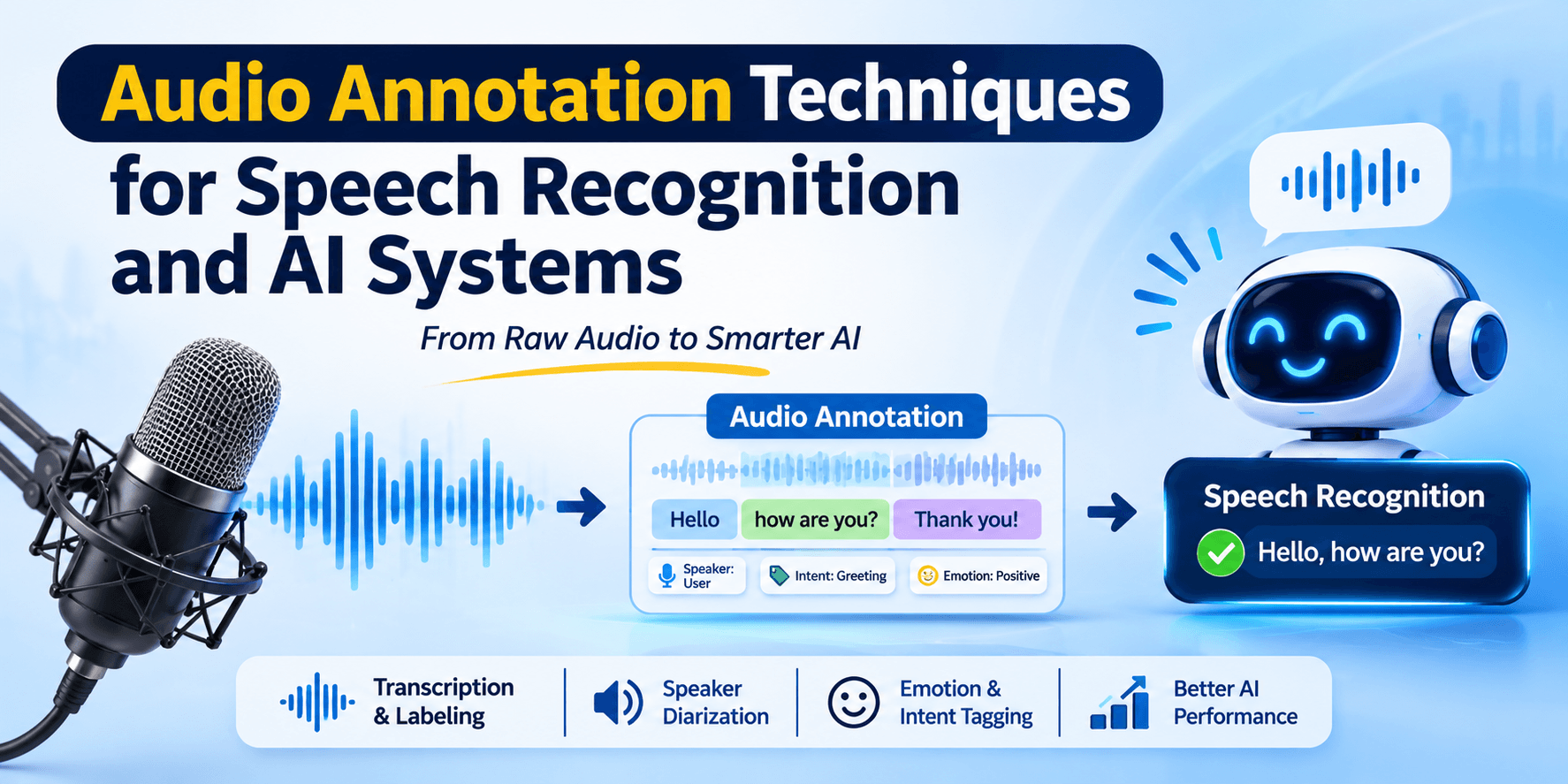
Ask a voice assistant for the weather, dictate a message while driving, or call a bank that routes you by voice — each time, a speech model has to turn sound waves into meaning in a fraction of a second. These systems feel effortless, but they are built on thousands of hours of audio that people carefully listened to, transcribed, timestamped and labeled.
Audio annotation is what turns raw recordings into training data. This guide walks through the core audio annotation techniques, what each one teaches a model, how to measure annotation quality, and how to build speech datasets that perform in the real world — not just in the lab.
Key Takeaways
• Audio annotation adds transcripts, timestamps, speaker labels, sound tags and other metadata to recordings so speech and audio models can learn from them.
• Different techniques train different skills: transcription for speech-to-text, diarization for "who spoke when", sound event tags for environmental awareness.
• Quality is measured with metrics like Word Error Rate (WER) and Diarization Error Rate (DER), plus human review against gold-standard clips.
• Speaker diversity matters. Models trained on narrow voice samples make far more errors for under-represented accents and dialects.
What Is Audio Annotation?
Audio annotation is the process of adding structured labels to audio files so a machine learning model can learn what the sounds mean. A label might be a word-for-word transcript, the start and end time of each sentence, which speaker is talking, the emotion in a voice, or the presence of a siren in the background.
It is one branch of the wider discipline of data annotation, and it follows the same principle: models learn from examples, and the examples are only as good as their labels. If you are unsure how annotation differs from simple tagging, our explainer on data annotation vs data labeling covers the distinction.
Why Speech Recognition and Audio AI Need Annotated Data?
Automatic speech recognition (ASR) models learn by comparing their predicted text against a correct transcript and adjusting until the two match. Without accurate transcripts aligned to audio, there is nothing to learn from.
Public datasets show how much careful labeling goes into this. The widely used LibriSpeech corpus from Johns Hopkins University contains around 1,000 hours of read English speech, segmented and aligned with text from audiobooks. Mozilla's community-built Common Voice dataset has grown to more than 33,000 hours across 133 languages, with over 22,000 of those hours validated by volunteer reviewers.
Even the largest modern models still depend on labeled audio. OpenAI's Whisper was trained on 680,000 hours of audio paired with transcripts gathered from the web — a "weakly supervised" approach that trades some label precision for enormous scale. But weak labels are not enough on their own. To fine-tune a model for a specific accent, domain or noisy environment, and to evaluate whether it actually works, teams still need high-quality, human-verified annotations.
Core Audio Annotation Techniques
Most speech and audio projects combine several of the techniques below. Choosing the right mix depends on what your model must do.
1. Speech Transcription
Annotators listen to audio and write down exactly what is said. Two styles are common:
• Verbatim transcription captures everything — fillers like "um" and "uh", false starts, repetitions, stutters and laughter. This is ideal for training ASR models that must handle natural, messy speech.
• Clean (non-verbatim) transcription removes fillers and minor errors for readability. It suits captioning, meeting notes and content indexing.
Transcription guidelines must also define how to handle numbers, abbreviations, brand names, profanity and words that are unclear. Small inconsistencies — "10" versus "ten" — add up to measurable errors at scale.
2. Timestamping and Segmentation
Long recordings are split into shorter segments, each tagged with precise start and end times. Word-level timestamps go further, marking when each individual word begins and ends. This alignment is essential for training models efficiently, generating subtitles that stay in sync, and letting users search within recordings.
3. Speaker Diarization
Diarization answers the question "who spoke when?" Annotators mark each turn in a conversation with a speaker label (Speaker 1, Speaker 2, Agent, Customer) and flag regions where people talk over each other. As pyannote explains, transcription captures the words while diarization adds the structure that attributes them — and most production systems need both. Call-center analytics, meeting assistants and interview transcription all depend on diarization labels.
4. Voice Activity Detection (VAD) Labeling
VAD annotation marks which parts of a recording contain speech and which contain silence, music or noise. It sounds simple, but it is the first step in almost every speech pipeline. Good VAD labels help models ignore background sounds and save compute by processing only the parts that matter.
5. Phonetic and Pronunciation Annotation
Here, speech is labeled at the level of individual sounds (phonemes) using a phonetic alphabet. Phonetic labels help train text-to-speech voices, pronunciation-scoring apps for language learners, and recognition models for languages with limited written resources.
6. Language, Dialect and Accent Identification
Annotators tag which language is spoken, the regional dialect or accent, and points where speakers switch languages mid-sentence. Code-switching is extremely common in India — Tamil-English, Hindi-English and many other mixes — and models that are never shown labeled examples of it struggle badly with real users.
7. Emotion and Paralinguistic Annotation
Beyond words, voices carry tone, stress, pitch and energy. Annotators label emotions such as anger, frustration, satisfaction or calm, along with cues like shouting, whispering or crying. These labels power customer-experience analytics, driver-monitoring systems and more empathetic voice agents.
8. Intent and Entity Annotation on Spoken Utterances
For voice assistants and IVR systems, transcripts are further labeled with the speaker's intent ("check balance", "book appointment") and key entities (dates, account types, locations). This bridges speech recognition and language understanding.
9. Sound Event Classification
Not all audio AI is about speech. Sound event annotation labels non-speech sounds: glass breaking, a dog barking, an engine knocking, a baby crying, machinery alarms. Google's AudioSet is the best-known example — an ontology of 632 audio event classes and more than two million human-labeled 10-second clips. These labels train security systems, smart-home devices, industrial monitoring and robots that need to react to their surroundings.
10. Noise and Acoustic Condition Tagging
Annotators note background conditions — traffic, crowd noise, echo, wind, low microphone quality — even when the main task is transcription. These tags let teams measure how a model performs in each condition and deliberately collect more data where it is weakest, a practice closely tied to edge case data collection.
Audio Annotation Techniques at a Glance
| Technique | What it teaches the model | Typical use cases |
|---|---|---|
| Transcription | Map sounds to words | ASR, dictation, captions |
| Timestamping and segmentation | Align words to time | Subtitles, search, training efficiency |
| Speaker diarization | Separate and attribute speakers | Call centers, meetings, interviews |
| Voice activity detection | Find where speech occurs | Wake words, every ASR pipeline |
| Phonetic annotation | Recognize individual sounds | Recognize individual sounds |
| Intent and entity tagging | Understand the request | Voice bots, IVR |
| Sound event classification | Recognize non-speech sounds | Security, industrial, robotics |
| Noise tagging | Evaluate robustness | Model testing, data planning |
The Audio Annotation Workflow, Step by Step
1. Define the use case and label schema. Decide which techniques you need, the label categories, and transcription style.
2. Collect representative audio. Cover the speakers, accents, devices, environments and topics your users will actually produce. Get documented consent for every recording.
3. Pre-process. Normalize formats and sample rates, remove corrupt files, and anonymize personal data such as names or account numbers.
4. Write detailed guidelines. Include examples for edge cases — overlapping speech, unintelligible words, code-switching, background speech.
5. Run a pilot and calibrate. Have multiple annotators label the same clips, compare results, and tighten the guidelines where they disagree.
6. Annotate at scale with model assistance. Let an existing ASR model produce a draft transcript, then have humans correct it. This is usually much faster than transcribing from scratch.
7. Review and quality-check. Use second-pass reviewers, hidden gold-standard clips and spot audits.
8. Train, test and iterate. Analyze where the model fails and annotate more data targeting those conditions.
How to Measure Audio Annotation Quality
Word Error Rate (WER) is the standard metric for transcription. It counts substitutions, deletions and insertions compared with a reference transcript, divided by the total number of words in the reference. It is used both to evaluate models and to audit annotators against gold transcripts.
Diarization Error Rate (DER) measures speaker labeling. As Kolena's documentation describes it, DER adds up the duration of false alarms, missed speech and speaker confusion, then divides by the total reference duration. Lower is better.
For classification-style labels such as emotion or sound events, teams use inter-annotator agreement scores (like Cohen's kappa) and accuracy against gold-standard clips. Whatever the metric, the principle is the same one we describe in our guide to data quality in AI training: define quality before you start, measure it continuously, and feed the results back into guidelines and training.
Common Challenges in Audio Annotation
• Accent and dialect bias. A Stanford-led study in PNAS tested speech recognition from five major tech companies and found an average WER of 0.35 for Black speakers compared with 0.19 for white speakers. The researchers recommended more diverse training data as a key fix — a reminder that who you record and annotate directly shapes who your product works for.
• Background noise and poor audio. Real-world recordings include traffic, echo and cheap microphones. Annotators need clear rules for marking inaudible segments rather than guessing.
• Overlapping speech. When people talk at once, both transcription and diarization become harder and slower.
• Low-resource languages. Many Indian and regional languages have limited public datasets, few trained annotators and inconsistent spelling conventions.
• Domain vocabulary. Medical terms, drug names, legal phrases and product codes require annotators with domain knowledge or specialist reviewers.
• Privacy and consent. Voice is personal data. Recordings need clear consent, secure storage, restricted access and anonymization of sensitive details.
• Annotator fatigue. Listening for hours reduces accuracy. Shorter sessions, task rotation and ongoing quality tracking help.
Real-World Applications of Audio Annotation
• Healthcare: clinical dictation, ambient documentation of doctor–patient conversations and voice-based symptom checkers. See how AI data supports healthcare.
• Automotive: in-car voice assistants and driver-monitoring systems that must work over road noise — a core need in the automobile sector.
• Insurance and banking: call-center analytics, claim intake by voice and compliance monitoring, relevant to insurance teams.
• Customer service: voice bots, IVR routing, agent coaching and sentiment tracking.
• Manufacturing and industrial: acoustic monitoring that detects unusual machine sounds before a breakdown, supporting manufacturing operations.
• Robotics and humanoids: robots that follow spoken commands and react to sounds in their environment. Audio is one of the inputs combined in sensor fusion for physical AI, and it is increasingly important for humanoid systems.
Best Practices for High-Quality Speech Datasets
• Record and annotate a diverse mix of speakers — age, gender, region, accent and speaking style.
• Match recording conditions to deployment: phone lines, car cabins, factory floors or quiet offices.
• Keep a single, versioned guideline document and update it when edge cases appear.
• Combine model pre-labeling with human correction for speed, but never skip human review.
• Hold back a carefully annotated gold test set that is never used for training.
• Track WER, DER and agreement per annotator, per language and per condition — not just overall.
• Pair audio with other data streams where it helps, such as video or sensor data, through multimodal data collection.
In-House vs Outsourced Audio Annotation
In-house teams offer direct control and are useful for highly confidential recordings, but recruiting fluent annotators across many languages and accents is slow and costly. Specialist partners bring trained annotators, ready-made workflows, quality systems and the ability to scale quickly. Many organizations use a hybrid model: internal experts own the guidelines and final review, while a partner handles volume. Our guide to in-house vs outsourced data annotation breaks down the trade-offs.
How Gamasome Helps You Build Better Audio AI
Gamasome builds real-world training data for AI systems that have to perform outside the lab. Our data annotation services use trained human annotators, documented guidelines, multi-stage review and measurable quality targets.
Because we specialize in multimodal and physical AI data, we can capture and annotate audio together with video, LiDAR and other sensor streams — so spoken commands, environmental sounds and actions stay aligned in time. Whether you are building a voice assistant, a call analytics tool or a robot that listens, we help you get from raw recordings to model-ready data.
Planning a speech or audio AI project? Talk to our team about your languages, data volume and accuracy goals.